


Welcome to the LinuxKernel web
ARM Linux Kernel
Summary
System requirementsSetting up kernel sources
Vendor Patchsets
Configuration
Building the kernel
Porting the kernel to a new platform
Android Platform
Power Management
Resume services
System requirements
Linux kernel sources will use anywhere from 40Mb to 80Mb of file system space on the host development platform. On the target platform, the binary kernel image and included modules should require in the order of 2Mb, depending on functionality selected when configuring the kernel. You will need to have suitable versions of the GNU compiler and other tools used to configure and build the kernel (make etc.). You can find more information on the development tools on the following LinuxDevTools page.Note that with the 2.6.x kernels you need a more recent version of module-init-tools package. More information on these tools is available on Rusty's pages.Setting up kernel sources
The latest sources are available from http://www.kernel.org, you can also use one of the mirror sites. You should read the Changelog file for details on differences between kernel versions.It is recommended that new development, i.e. any work liable to result in a set of patches, be based against this tree or the git .A version of the kernel tested against ARM Ltd. platforms (RealView Versatile and RealView Integrator) is accessible on the following pages. Sources and binaries on this page are updated against successive releases of the main kernel.org tree, and may contain changes that have not yet been integrated into the main tree.ARM kernel patches which have not yet been merged upstream (or are in the review process) are available from the following http://www.linux-arm.org/git GIT tree.Patches are submitted both to the kernel main tree and to the linaro kernel tree. ARM kernel patches may be present in the linaro tree before acceptance into the main kernel tree.Vendor Patchsets
Some vendors that sell chips with embedded ARM cores have associated patches available for specific versions of the Linux kernel. Typically you apply these by unpacking the kernel, changing directory into the unpacked kernel and executing something like 'patch -p1 </path/to/patchfile.patch'Please, refer to the Platform Info page on this site for pointers and information on individual boards.Configuration
The configuration process allows users to select features to be included in the kernel image. This usually requires knowledge of the hardware platform and environment you will use to run Linux. Current kernels have graphical configuration utilities and usually provide help sections for most of the configuration options. All the selected options are kept in a .config file located at the base of your source tree.Make sure that you backup existing .config file before it is being edited and modified by any configuration utility. If you are using a distribution from a vendor, the default configuration files are usually included in the or a dedicated directory. You can use these configuration files as a starting point for your customisations.With 2.6.x kernels there are few main front-end programs which can be used to configure the kernel: config, oldconfig, menuconfig, and xconfig.- config presents a series of questions to be answered sequentially. In case of error, you must begin the process from the beginning. Pressing <Enter> will accept the default entry (usually labelled in upper case).
- oldconfig read the defaults from an existing .config and rewrite necessary links and files. Use this option if you've made minor changes to source files or need to script the rebuild process.
- menuconfig is a front-end based on ncurses. Make sure that you have ncurses libraries installed on you host platform to use this utility. Use the arrow keys to navigate the menu. Press <Enter> to select sub-menus. Press the highlighted letter on each option to jump directly to that option. To build an option directly into the kernel, press <Y>. To disable an option entirely, press <N>. To build an option as a loadable module, press <M>. You can also access content-specific help screens by pressing <?> on each page or selecting <HELP> from the lower menu.
- xconfig is a graphical front-end using qconf by Roman Zippel and provide a more intuitive and customizable interface. It requires the Qt and X libraries to build and use. An online help is automatically displayed for each kernel configuration option and dependencies for each module is also displayed (c.f. qconf snapshot below).
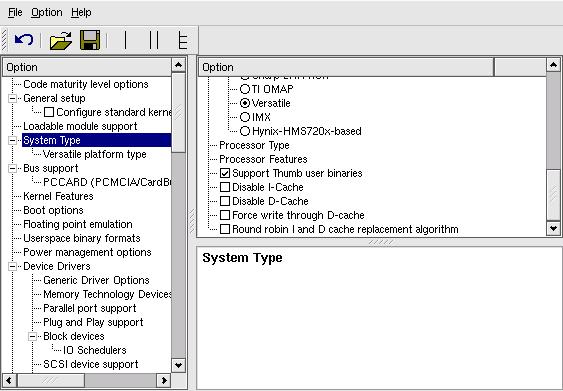
Building the kernel
The kernel is built by doing a 'make Image' or 'make bzImage'. The resulting kernel image should be in the arch/arm/boot directory. You can use these images to load them either in RAM or Flash memory to be executed.The build process also produces a vmlinux file is which contains debugging information associated to the kernel image. This file can be loaded from a debugger (when or after the kernel starts its execution) to perform symbolic debug.The Linux kernel assumes that the boot loader has initialised the platform and stored identification of the platform ID (cf. arch/arm/tools/mach-types in the kernel tree) and boot parameters in specific registers. The platform number is needed by the kernel before starting its execution and the CMDLINE should also be set by the boot loader. When starting the kernel directly from a debugger, these register values need to be set from within the debugger.Porting the kernel to new platforms
The following page provides information on the main steps to port Linux to a new ARM platform. Additional resources are referenced on this site/page in the community detailing some of these steps. This is by no means complete so feel free to add more information as appropriate.Building Linux for Android platforms
The following page describes the various steps to build Android for ARM RealView platforms.Additional information
- Linux Device Drivers Third Edition, by Jonathan Corbet, Alessandro Rubini, and Greg Kroah-Hartman.
- Mel Gorman's book: "Understanding the Linux Virtual Memory Manager".
- Opersys provide some note on building Linux systems.
- The following link provides some documentation on how to build kernels.
- Wookey published the following document describing how to port the Linux kernel to a new ARM based platform.
- Document on Memory Barriers: PDF
| I | Attachment | Action | Size | Date | Who | Comment |
|---|---|---|---|---|---|---|
 pdf pdf | aleph-porting.pdf | manage | 122.3 K | 07 Feb 2006 - 11:28 | PhilippeRobin | |
| pdf | gorman_linux_vm.pdf | manage | 8515.2 K | 07 Feb 2006 - 11:37 | PhilippeRobin | |
 jpg jpg | qconf.jpg | manage | 42.4 K | 20 Jan 2006 - 13:46 | PhilippeRobin |
 Create New Topic
 Index
Index Search
 Changes
 Notifications
 Statistics
 Preferences
 |
 Copyright © by the contributing authors. All material on this collaboration platform is the property of the contributing authors.
Ideas, requests, problems regarding Foswiki? Send feedback
zenweb1 : 0.16 secs More Info